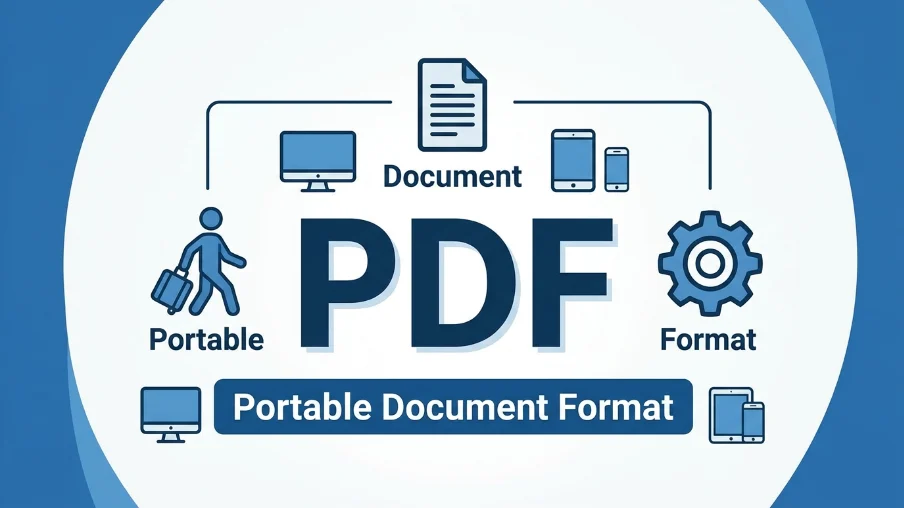
PDF stands for Portable Document Format. It is a file format that preserves document layouts, fonts, and images exactly as intended, regardless of the device, software, or operating system used to view it . Created by Adobe in 1993, it is now an open ISO standard used worldwide for sharing and archiving documents .
Have you ever opened a document on a different computer and found the layout completely broken? Fonts look wrong, images shift, and margins change. This frustrating problem used to happen all the time. Then the PDF changed everything.
PDF stands for Portable Document Format. It is a file type that keeps documents looking exactly the same on any device . Whether you open a PDF on a Windows PC, a Mac, a tablet, or a phone, it will look identical. The fonts, images, and layout remain consistent .
You encounter PDFs daily. They appear in emails, on websites, and in official documents. Businesses use them for contracts. Students use them for assignments. Governments use them for forms. Understanding what a PDF is and how it works helps you use it more effectively.
This article explores everything about PDFs. You will learn the meaning, history, technical details, and practical uses. By the end, you will understand why PDFs are so important and how to use them better. Good digital literacy depends on understanding these essential tools.
Key Takeaway
The main takeaway is that PDF stands for Portable Document Format and is a universal file format that preserves document appearance across all devices and platforms . It was developed by Adobe in 1993 and became an open ISO standard in 2008 . The PDF format captures text, fonts, graphics, and layout information in a single file, ensuring documents appear exactly as intended by the creator. This portability and consistency make PDFs the global standard for sharing and archiving digital documents.
Definition and Explanation
What Is PDF? The Full Form and Meaning
PDF stands for Portable Document Format . The word “portable” is the key to understanding its purpose. A PDF file can be moved (ported) from one system to another while keeping its exact appearance .
A PDF file captures everything needed to display a document correctly. This includes:
- Text content
- Fonts and typefaces
- Images and graphics
- Layout and formatting
- Colors and styling
- Hyperlinks and interactive elements
The format was designed to solve a specific problem. Before PDFs, sharing documents between different computers often caused formatting issues. A document created on one system might look completely different when opened on another . PDF fixed this by embedding all necessary information within the file itself.
How PDF Files Work
PDF files work by encapsulating a complete description of a document . This description includes all the elements needed to display the document faithfully. The file structure consists of several components.
| Component | Description | Purpose |
| Header | Identifies the file as PDF and specifies the version | Allows readers to verify file type and version |
| Body | Contains document content and objects | Stores text, images, fonts, and graphics |
| Cross-Reference Table | Maps object locations within the file | Enables quick access to specific parts |
| Trailer | Provides file structure information | Guides the reader to find key sections |
Technical Foundations of PDF
PDF combines three key technologies :
- PostScript Subset: PDF uses a simplified version of the PostScript page description language. This handles the layout and graphics generation.
- Font Embedding: PDF embeds fonts directly into documents. This ensures text appears correctly even if the recipient does not have the font installed.
- Structured Storage: PDF bundles all elements into a single, compressed file. This makes distribution efficient and simple.
Linear vs. Non-Linear PDFs
PDF files can be organized in two ways :
| Type | Description | Best For |
| Linear PDF | Pages are arranged sequentially; loads progressively | Online viewing, web use |
| Non-Linear PDF | Pages are scattered; takes more processing to display | File size efficiency, archiving |
Advantages and Disadvantages
Understanding the strengths and weaknesses of PDFs helps you use them effectively.
Advantages of Using PDFs
PDFs offer several important benefits that explain their widespread adoption.
- Consistent Appearance: PDFs preserve formatting perfectly across all devices and platforms. What you create is exactly what others see .
- Universal Compatibility: PDFs work on virtually any device. A single file works on Windows, Mac, Linux, iOS, and Android .
- Self-Contained: A PDF includes everything it needs. Fonts, images, and graphics are embedded in the file .
- Security Features: PDFs support encryption, password protection, and digital signatures .
- Compact Size: PDF files use compression to reduce file size without sacrificing quality .
- Print Ready: PDFs are designed to produce accurate prints directly from the file.
- Interactive Elements: PDFs can include hyperlinks, forms, buttons, and multimedia content .
Disadvantages of Using PDFs
Despite their advantages, PDFs have some limitations.
- Limited Editability: PDFs are designed for final documents. Editing them requires specialized software .
- Not Ideal for Web: While PDFs work online, they are not optimized for responsive web design.
- Accessibility Concerns: Some PDFs are not fully accessible to screen readers without proper tagging.
- File Size: Complex PDFs can be large, especially with embedded fonts and high-resolution images.
- Version Compatibility: Very old or new PDF versions may have compatibility issues.
- Mobile Viewing: Complex layouts can be difficult to read on small screens.
| Aspect | Advantage | Disadvantage |
| Appearance | Consistent everywhere | Can be hard to read on small screens |
| Editability | Secure, final format | Difficult to edit without tools |
| Compatibility | Works on all devices | Older versions may not open |
| Security | Strong encryption | Can be difficult to extract content |
Real-World Examples
PDFs appear in countless everyday situations. Here are some common use cases.
Business and Professional Use
Businesses rely heavily on PDFs for many purposes.
- Contracts and Agreements: PDFs preserve legal document formatting. Companies send contracts as PDFs to ensure they appear correctly .
- Invoices and Billing: Many businesses send invoices as PDF attachments. The formatting stays consistent across accounting systems.
- Reports and Presentations: Professional reports use PDFs to maintain branding and layout. Internal and external sharing is reliable.
- Marketing Materials: Brochures, flyers, and product sheets are often PDFs. Printing is accurate and professional.
Education and Academic Use
PDFs are essential in education at all levels.
- Research Papers: Journals publish articles as PDFs. The formatting ensures consistency across citations and references.
- Student Assignments: Many universities require students to submit work as PDFs. This ensures all instructors see the same formatting .
- Textbooks and Study Materials: Digital textbooks often use PDF format. Students can access them on any device.
- Course Syllabi: Professors share syllabi as PDFs. Students can view and print them easily.
Government and Legal Use
Governments and courts use PDFs for official documents.
- Legal Documents: Courts accept PDF filings. The format preserves the original document integrity.
- Official Forms: Government agencies use fillable PDF forms. Citizens can complete them digitally.
- Public Records: Archives preserve documents as PDFs. The format ensures long-term accessibility.
Personal Use
Individuals use PDFs for many personal purposes.
- Resumes and CVs: Job seekers send PDF resumes. The formatting looks professional on any device.
- Personal Records: Scanned documents are often saved as PDFs. This preserves the original appearance.
- E-Books: Many digital books use PDF format. Readers can access them on multiple devices.
- Receipts and Confirmations: Online orders often provide receipts as PDFs. Customers can save them for records.
Regional and Global Usage
PDFs are used worldwide. The format is the same in all regions.
Global Standard
PDF is an international standard. The International Organization for Standardization (ISO) maintains the PDF specification. It is listed as ISO 32000 . This global standardization ensures universal compatibility.
Regional Variations
While the PDF format itself does not vary by region, usage patterns differ.
| Region | Common Uses | Notes |
| North America | Business, legal, education | High adoption in corporate and legal sectors |
| Europe | Government, business, archiving | Strong use in public administration |
| Asia Pacific | Education, business, manufacturing | Growing adoption in digital document workflows |
| Latin America | Government, business | Increasing use in public services |
Language Support
PDFs support all major languages. The format handles different character sets and fonts. This makes PDFs suitable for global communication. Unicode support allows documents to include multiple scripts and symbols.
Common Mistakes
Understanding common PDF errors helps you avoid them.
Mistake 1: Not Embedding Fonts
When fonts are not embedded, the recipient’s device substitutes them. This changes the document appearance. Embedded fonts ensure the document looks as intended .
Correction: Always embed fonts when creating PDFs. Most PDF creation tools offer this option. Check the settings before saving.
Mistake 2: Using PDFs for Everything
PDFs are not always the best choice. They are designed for final, fixed-layout documents. For editable documents or web content, other formats may be better.
Correction: Choose the right format for your purpose. Use Word for editable documents, HTML for web content, and PDF for final, shareable files.
Mistake 3: Ignoring Accessibility
Some PDFs are not accessible to people with disabilities. Screen readers need tagged content to work properly. Untagged PDFs may be unreadable.
Correction: Create accessible PDFs when possible. Use proper tags and structure. Provide alternative text for images.
Mistake 4: Inadequate Compression
Large PDFs are difficult to share and store. Without proper compression, files become unwieldy.
Correction: Compress PDFs appropriately. Use tools that reduce file size while maintaining quality.
Mistake 5: Overlooking Security
PDFs can contain sensitive information. Without proper security, they are vulnerable to unauthorized access.
Correction: Use PDF security features when needed. Add password protection, restrict editing, and use encryption for confidential documents.
Exercises
Test your knowledge with these exercises.
Exercise 1: PDF Meaning and Full Form
- What does PDF stand for?
- What is the primary purpose of the PDF format?
- When was PDF first released?
- What organization standardized PDF as an international standard?
Exercise 2: Identifying PDF Features
Identify whether each statement is true or false:
- PDF files always look the same on different devices.
- PDFs are easy to edit like Word documents.
- PDF stands for “Portable Document Format.”
- PDFs cannot contain images or multimedia.
- PDFs can be password protected.
Exercise 3: Choosing the Right Format
Choose the best format for each scenario (PDF, Word, HTML):
- Creating a resume to email to an employer
- Building a webpage for a company website
- Drafting a report that needs further editing
- Submitting a final assignment to a professor
- Sharing a contract for signature
Answer Key
Exercise 1 Answers:
- Portable Document Format
- To preserve document appearance across different devices and platforms
- 1993
- International Organization for Standardization (ISO)
Exercise 2 Answers:
- True
- False
- True
- False (PDFs can contain images)
- True
Exercise 3 Answers:
- PDF (professional, consistent formatting)
- HTML (web format)
- Word (editable format)
- PDF (final, non-editable format)
- PDF (preserves formatting, secure)
Related Concepts and Comparisons
Understanding how PDF relates to other formats helps you choose correctly.
PDF vs. Word Documents
| Feature | Word (DOCX) | |
| Purpose | Final format, sharing | Editing, drafting |
| Editability | Limited | Full |
| Appearance | Fixed, consistent | Can change by device |
| Compatibility | Universal | May vary by version |
| Printing | Professional | Can be inconsistent |
PDF vs. HTML
| Feature | HTML | |
| Purpose | Fixed layout documents | Web content |
| Appearance | Fixed | Dynamic, responsive |
| Device Adaptation | Fixed | Adapts to screen size |
| Interactivity | Limited | High |
| Editability | Limited | Easy with editors |
PDF vs. Images
| Feature | Image (JPG/PNG) | |
| Text Content | Selectable and searchable | Not selectable |
| Scalability | Excellent, vector-based | Can become pixelated |
| File Size | Compressed, efficient | Often larger |
| Print Quality | Professional | Good but limited |
PDF Subsets and Specialized Standards
Several specialized PDF standards exist for specific purposes.
| Standard | Purpose | Use Case |
| PDF/A | Archiving | Long-term document preservation |
| PDF/X | Print production | Professional printing |
| PDF/E | Engineering | Technical documentation |
| PDF/UA | Accessibility | Accessible documents |
| PDF/VT | Variable data printing | Personalized printing |
FAQs
What is the full form of PDF?
PDF stands for Portable Document Format . This file format preserves document appearance across different devices and platforms.
What does PDF mean in computers?
In computers, PDF means Portable Document Format. It is a file format that maintains document layout, fonts, and formatting regardless of the software or operating system used to view it .
Who created PDF and when?
Adobe Systems created PDF in 1993 . A team led by Randy Adams developed it as a way to share documents across different computer platforms.
When did PDF become an open standard?
PDF became an open standard in 2008. The International Organization for Standardization (ISO) published it as ISO 32000-1 .
What are the main features of PDF files?
PDF files support text, fonts, images, graphics, hyperlinks, forms, digital signatures, encryption, and multimedia . They are self-contained, meaning all necessary elements are embedded in the file.
How do I open a PDF file?
You can open a PDF file with Adobe Acrobat Reader, which is free to download . Most web browsers also support PDF viewing. Many other free and paid viewers are available.
Are PDFs secure?
Yes, PDFs offer security features. You can encrypt files, password protect them, and add digital signatures . These features help protect sensitive information.
Can I edit a PDF file?
PDFs are designed as final documents and are difficult to edit . However, specialized software like Adobe Acrobat Pro allows editing. Many free online tools also offer basic PDF editing.
What is PDF/A?
PDF/A is a specialized PDF format for archiving . It ensures documents remain readable long-term. PDF/A requires self-contained documents without external dependencies.
Why do people use PDFs?
People use PDFs because they preserve formatting perfectly, work on all devices, are secure, and are print-ready . They are ideal for final documents, contracts, and official records.
Is PDF better than Word?
It depends on your needs. PDF is better for final, shareable documents. Word is better for drafting and editing. PDFs keep appearance consistent. Word files are editable.
Conclusion
This guide has explored the meaning and importance of PDFs. PDF stands for Portable Document Format. It is a universal file format that preserves document appearance across all devices and platforms . Created by Adobe in 1993 and now an ISO standard, PDFs have become essential for sharing and archiving documents worldwide .
PDFs offer clear advantages. They maintain consistent formatting, work on any device, and support security features. They are used everywhere from business contracts to academic papers to government records . Understanding how to use PDFs effectively is a valuable digital skill.
The best practical advice is to use PDFs when you need reliable, fixed-layout documents. For editable content, use other formats like Word. For web content, use HTML. Knowing when to use each format helps you communicate more effectively. PDFs will remain a cornerstone of digital communication for years to come.