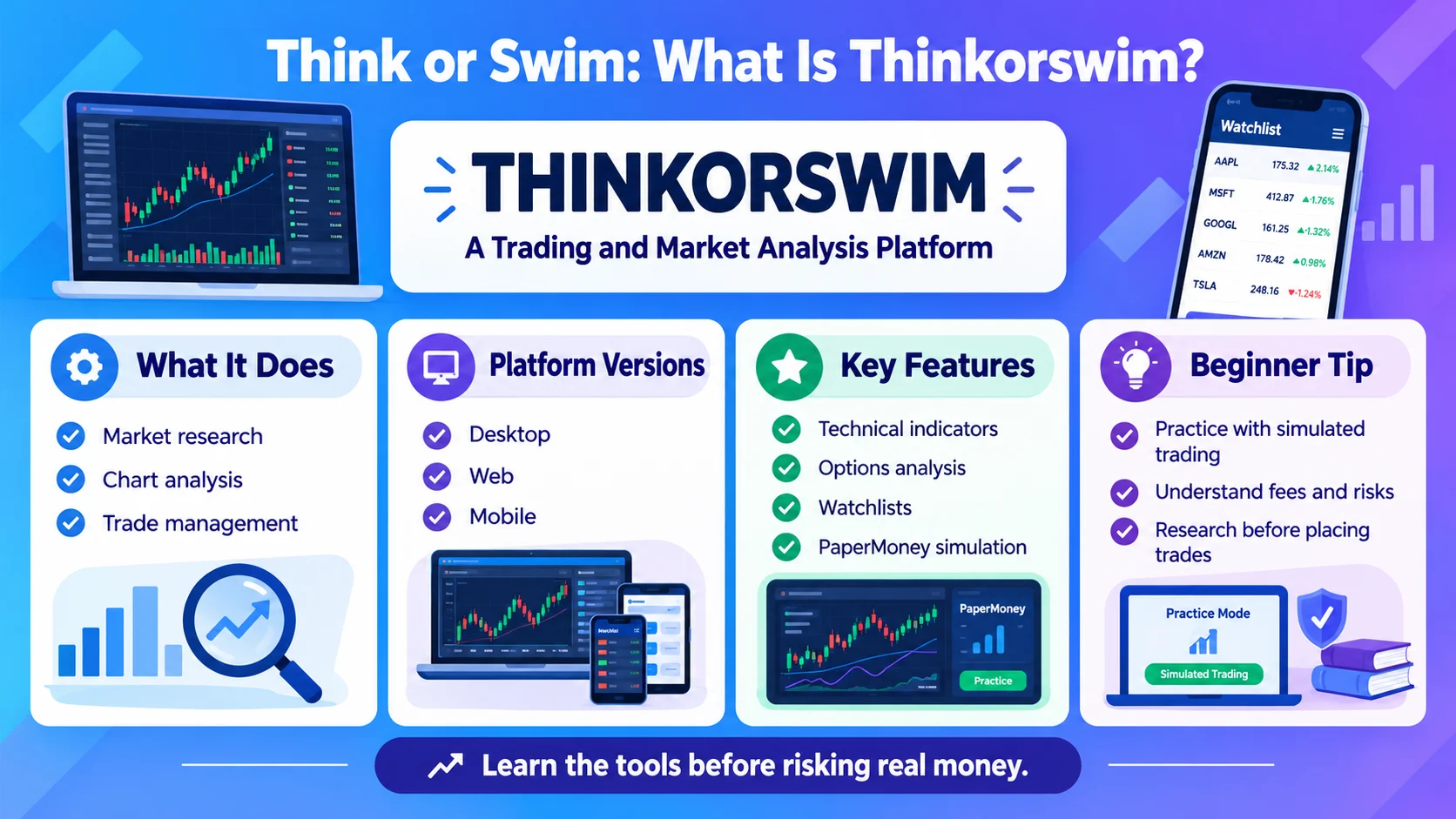
Thinkorswim usually refers to think or swim, a trading platform from Charles Schwab designed for researching financial markets, analyzing charts, and placing trades. It offers desktop, web, and mobile versions, along with tools for stocks, options, futures, and other eligible investments.
Whether you are a beginner learning about trading or an experienced investor exploring advanced charting tools, think or swim provides a range of features for studying market movements. In addition, its paper Money feature lets users practice trading strategies in a simulated environment without risking real money.
This guide explains what thinkorswim means, how the platform works, its main features, and what beginners should know before using it.
What Is Think or swim?
Think or swim is a trading and market analysis platform offered by Charles Schwab. It gives eligible account holders tools to research financial instruments, analyze price movements, develop strategies, and place trades.
The platform is particularly known for its advanced charting capabilities and customizable workspace. For example, traders can add technical indicators to charts, compare price movements, and examine different market scenarios.
Moreover, think or swim supports several trading products, including stocks, options, futures, and forex, subject to account eligibility and product availability.
The platform comes in three main versions:
- Desktop: A feature-rich application with extensive customization and advanced analysis tools.
- Web: A browser-based version that does not require a software download.
- Mobile: An app for monitoring markets and managing eligible trading activities while away from a computer.
Although think or swim offers powerful features, it does not guarantee profitable trades. Market prices can change quickly, and every investment carries some level of risk.
What Does Think or Swim Mean?
The phrase “think or swim” can have two different meanings depending on context.
Think or swim as a Trading Platform
In financial discussions, think or swim usually refers to the think or swim platform. Traders use it to examine markets, study charts, test strategies, and manage trades.
For example, someone might say, “I use think or swim to analyze stock charts before making a trade.”
Think or Swim as an Expression
Outside finance, “sink or swim” is the familiar English expression meaning that someone must succeed or fail through their own efforts, often without much help.
“Think or swim” may appear as a playful variation, a mistaken version of “sink or swim,” or a reference to the trading platform.
Therefore, context helps determine the intended meaning. If the conversation mentions brokerage accounts, charting, or stocks, it probably refers to think or swim.
Key Features of Think or swim
Think or swim offers several tools that help users study financial markets and manage their trading activities.
1. Advanced Charting
The platform provides customizable charts for analyzing price movements over different time periods.
Users can adjust chart layouts, compare symbols, and add technical studies. As a result, they can examine historical price behavior and monitor current market activity.
However, chart patterns do not reliably predict every future price movement.
2. Technical Indicators
Technical indicators help traders interpret price, volume, momentum, and trends.
Depending on the chart and study selected, users can examine tools such as moving averages, relative strength index (RSI), and MACD.
These indicators can support research, but they should not be treated as automatic buy or sell signals.
3. Options Analysis
Think or swim includes tools for researching options strategies and examining potential outcomes.
Users can explore options chains, compare strike prices and expiration dates, and review theoretical profit-and-loss scenarios.
Because options can be complex and may expire worthless, beginners should learn how contracts work before placing real trades.
4. Watchlists and Market Monitoring
Watchlists let users organize securities they want to follow.
For instance, a trader might create separate lists for technology stocks, dividend-paying companies, or potential trading opportunities.
Meanwhile, market monitoring tools help users track prices and review relevant information within the platform.
5. Customizable Workspace
Think or swim allows users to arrange charts, watchlists, trading tools, and other panels according to their preferences.
This flexibility is useful for active traders who want several pieces of information visible at once. However, the number of options can make the interface feel complicated at first.
6. Paper Money Simulation
Paper Money is think or swim’s simulated trading environment. It lets users practice strategies without placing simulated trades with their own real money.
For example, a beginner can practice entering an order, reviewing a chart, or testing a trading idea.
Even so, simulated results do not guarantee similar outcomes in live markets. Real trading involves emotions, execution differences, and financial risk.
Is Think or swim Free to Use?
Think or swim is available to eligible Charles Schwab clients without a separate platform access fee. However, normal account requirements, trading commissions, contract fees, and other charges may apply depending on the product and transaction.
For example, Schwab advertises online commission-free trading for listed stocks and exchange-traded funds, while options trades generally carry a per-contract fee. Other products may have different pricing.
Therefore, free platform access does not mean every trade is free.
Before placing an order, review the current pricing schedule and understand any applicable fees. You should also check eligibility requirements for specific products, especially options and futures.
Is Think or swim Good for Beginners?
Think or swim can help beginners learn about markets because it combines charting, research, education, and simulated trading in one environment.
Nevertheless, its advanced interface may feel overwhelming to someone who has never traded before.
A beginner can make the learning process easier by starting with a few basic tools:
- Learn how stock quotes and charts work.
- Create a watchlist of familiar companies.
- Explore a small number of technical indicators.
- Practice entering and reviewing simulated orders.
- Study investment risks before using real money.
In addition, beginners should avoid trading products they do not understand. Options, futures, and leveraged strategies can produce substantial losses.
Think or swim can be useful for learning, but it does not replace financial education or careful decision-making.
How to Use Think or swim
The exact setup depends on the version you choose and your account eligibility. Still, the basic process is similar across the platform suite.
Step 1: Choose a Platform
Select desktop, web, or mobile based on your needs.
Desktop provides the broadest customization. Meanwhile, web is convenient for browser access, and mobile supports monitoring and trading on compatible devices.
Step 2: Access Your Account
Follow Charles Schwab’s current account and login requirements. Available features may vary depending on your account type and permissions.
Step 3: Find a Market Symbol
Search for a company’s name or ticker symbol to view its market information.
For example, entering a stock ticker lets you examine its quote, chart, and related trading options.
Step 4: Study the Chart
Choose a time frame and review the price history. You can then add indicators or drawing tools if they help answer your research question.
However, avoid relying on a single indicator when assessing an investment.
Step 5: Practice Before Trading
Use paper Money to become familiar with order entry and platform controls.
Once you understand the tools, review the risks and costs before considering a real transaction. Practice alone does not remove the possibility of losses.
Think or swim Desktop vs. Web vs. Mobile
Each version serves a different purpose.
| Feature | Desktop | Web | Mobile |
|---|---|---|---|
| Installation | Required | Not required | App required |
| Advanced customization | Extensive | More streamlined | Adapted to mobile |
| Charting tools | Extensive | Core charting tools | Mobile-friendly charts |
| Best use | Detailed research | Browser-based access | Monitoring on the go |
| Paper trading | Available | Availability depends on current platform features | Check current app features |
Overall, desktop is a strong choice for detailed analysis, while web suits people who prefer not to install software. Mobile is convenient for checking markets and managing eligible trades away from a computer.
Think or swim vs. Other Trading Platforms
Think or swim is one option among several trading platforms. The best choice depends on your experience, preferred products, research needs, and account requirements.
| Consideration | Thinkorswim | Simpler Trading Apps |
|---|---|---|
| Advanced charting | Extensive tools | May offer fewer tools |
| Customization | High on desktop | Often more limited |
| Learning curve | Can be steep | Often easier initially |
| Simulated trading | Paper Money available | Depends on provider |
| Best suited for | Research-focused and active traders | Users seeking simpler workflows |
Think or swim may appeal to people who want detailed market analysis. By contrast, someone who only wants to make occasional long-term investments may prefer a simpler interface.
Before choosing, compare fees, available investments, educational resources, account eligibility, and usability.
Common Mistakes to Avoid on Think or swim
New users can make avoidable mistakes while learning a complex trading platform.
Relying on One Indicator
A technical indicator provides information, not certainty. Therefore, examine the broader market context and understand what each tool measures.
Confusing Paper Trading With Real Trading
Simulated trades help you learn the platform. However, they do not fully reproduce the emotions or execution conditions of live markets.
Ignoring Order Types
Market, limit, and stop orders behave differently. Learn how each order works before submitting a transaction.
Trading Complex Products Too Early
Options and futures involve risks that may not be obvious to new traders. Start by understanding the product, possible losses, and account requirements.
Making Decisions Based on Hype
Online posts and short-term predictions can encourage impulsive trades. Instead, research the investment and assess whether the risks fit your financial circumstances.
Frequently Asked Questions
What is think or swim used for?
Think or swim is used to research financial markets, analyze charts, monitor securities, and place eligible trades. It supports tools for stocks, options, futures, and other products, depending on account eligibility and availability.
Is think or swim free?
Eligible Charles Schwab clients can access think or swim without a separate platform fee. However, transaction costs, options contract fees, and other charges may apply, so users should review the current pricing schedule.
Can beginners use think or swim?
Yes. Beginners can use think or swim to learn charting and practice strategies through paper Money. However, its advanced interface takes time to understand, and simulated results do not guarantee success with real money.
Does think or swim have a mobile app?
Yes. Think or swim has a mobile app for compatible devices. It allows users to monitor markets, review charts, and access supported trading tools while away from a desktop computer.
What is paperMoney on thinkorswim?
Paper Money is a simulated trading environment that lets users practice strategies without risking real money on those simulated trades. It can help beginners learn order entry, although live trading conditions may differ.
Can you trade options on think or swim?
Think or swim provides options research and trading tools for eligible accounts. Options involve significant risks, including the potential to lose the entire amount paid for a contract, so users should understand the product before trading.
Is think or swim the same as sink or swim?
No. Think or swim is a trading platform. The expression “sink or swim” means that someone must succeed or fail through their own efforts. “Think or swim” may be a variation or a reference to the platform.
Is think or swim available on a web browser?
Yes. Think or swim web provides browser-based access without requiring a desktop installation. It includes core trading and analysis features, although some advanced tools available on desktop may not be supported.
Conclusion
Think or swim is a powerful trading and market analysis platform that helps users research investments, study charts, and manage eligible trades. Its desktop, web, and mobile versions offer different ways to access market tools. In addition, paper Money gives beginners a place to practice strategies without risking real money on simulated trades. However, advanced features require time to learn, and no platform can guarantee investment profits. Before trading, understand the products, costs, and potential losses involved. Ultimately, think or swim can support informed research, but careful decisions and sound risk management remain essential.