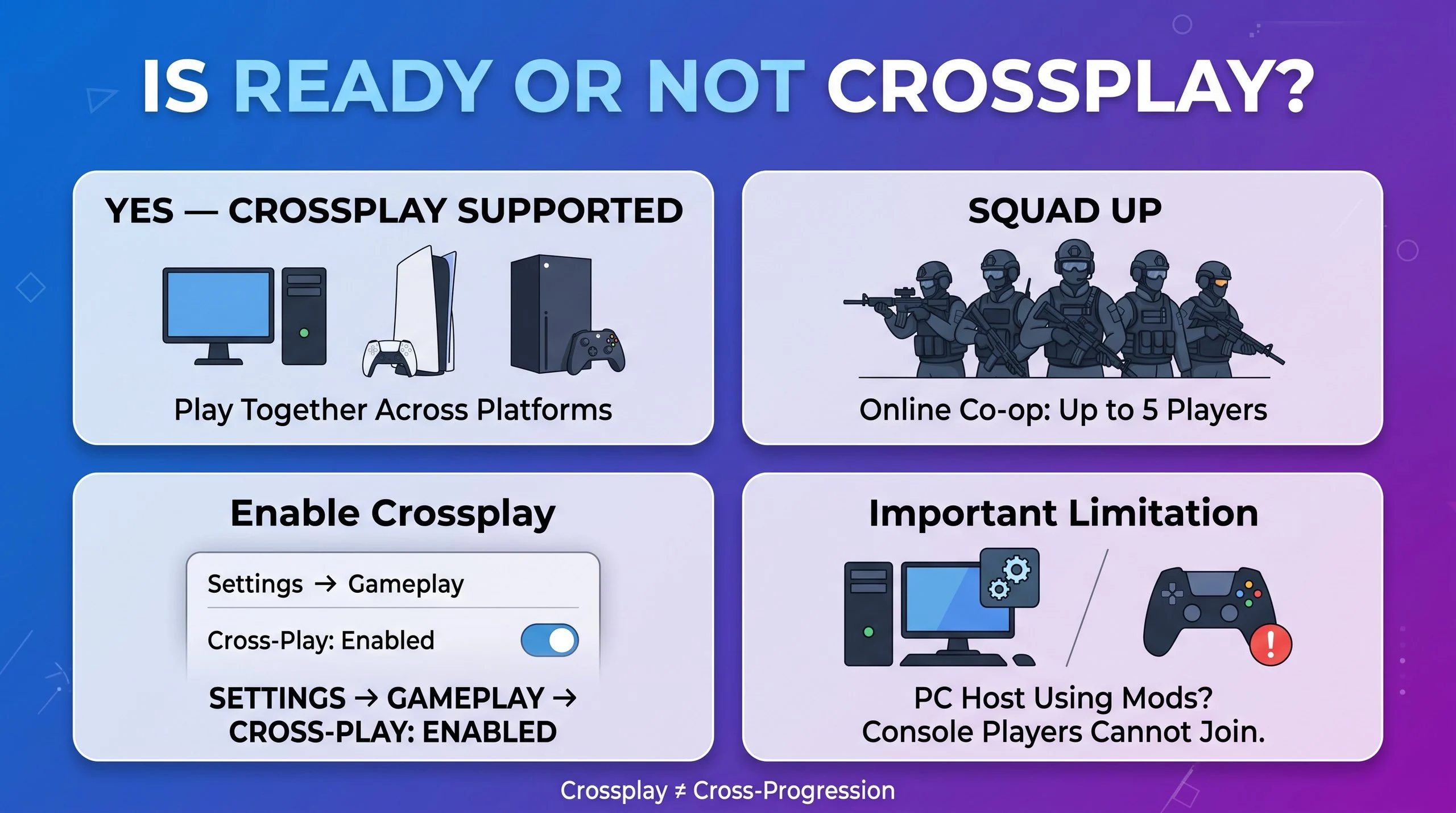
Yes, Ready or Not supports crossplay between PC, PlayStation 5, and Xbox Series X|S. Players can team up for online co-op missions across these platforms. However, console crossplay must be enabled, and PC hosts using mods cannot bring console players into their sessions.
Wondering, is Ready or Not crossplay? The answer is yes. The tactical first-person shooter supports cross-platform multiplayer, allowing players on PC, PlayStation 5, and Xbox Series X|S to play together.
This feature makes it easier to form a squad even when your friends use different gaming systems. For example, a PC player can join a mission with friends on PS5 or Xbox, provided everyone has crossplay enabled and the session meets the game’s compatibility requirements.
However, a few limitations are worth understanding before you start. Console crossplay may be disabled by default, and PC mods can prevent console players from joining a hosted session. Crossplay also differs from cross-progression, which determines whether your game progress transfers between platforms.
This guide explains how Ready or Not crossplay works, how to enable it, and how to fix common multiplayer problems.
Ready or Not Crossplay
| Feature | Supported? |
|---|---|
| PC and PS5 crossplay | Yes |
| PC and Xbox Series X|S crossplay | Yes |
| PS5 and Xbox Series X|S crossplay | Yes |
| Steam and Epic Games Store crossplay | Yes |
| Online co-op | Yes, up to five players |
| Crossplay with a modded PC host | No, not for console players |
| Full cross-progression across every platform | No |
| Split-screen co-op | No |
These details distinguish cross-platform multiplayer from save transfers and local multiplayer.
What Is Ready or Not?
Ready or Not is a tactical first-person shooter developed by VOID Interactive. Players take the role of SWAT officers who respond to dangerous situations, clear buildings, rescue hostages, and complete missions that require careful planning.
Unlike fast-paced arcade shooters, the game emphasizes communication, teamwork, tactical movement, and controlled decision-making. Players must coordinate their actions rather than rush into every encounter.
The game supports solo play with AI-controlled teammates as well as online cooperative missions. Therefore, you can play alone if your friends are unavailable, or build a squad for multiplayer operations.
Crossplay expands those multiplayer options by allowing compatible players on different platforms to join the same team.
Which Platforms Support Ready or Not Crossplay?
Ready or Not supports crossplay across its PC and current-generation console versions.
PC: Steam and Epic Games Store
PC players can play together across the supported PC storefronts. They can also join compatible console players through cross-platform multiplayer.
However, PC modifications introduce an important limitation. If a PC host uses mods, console players cannot join that session. Consequently, a mixed-platform group should use an unmodded game session.
PlayStation 5
PS5 players can team up with compatible PC and Xbox Series X|S players. They can also play with other PS5 users.
Nevertheless, crossplay settings and any applicable platform restrictions can affect matchmaking. If cross-platform players do not appear, check the game’s settings before troubleshooting anything more complicated.
Xbox Series X|S
Xbox Series X|S players can join compatible PC and PS5 players. The Xbox version also supports online cooperative play.
As with PS5, the crossplay setting must be enabled when needed. In addition, online multiplayer on Xbox may require an eligible multiplayer subscription.
How to Enable Crossplay in Ready or Not
Crossplay is straightforward to configure, although console players should check the setting first.
Step 1: Open the Main Menu
Launch Ready or Not and wait until the main menu appears. If you are already inside a mission, return to the main menu before changing the global crossplay setting.
Step 2: Open Settings
Select Settings or Options, depending on your platform and menu version.
Step 3: Select Gameplay
Open the Gameplay or Gameplay Options section. Look for the crossplay setting, usually listed toward the bottom of the menu.
Step 4: Enable Crossplay
Set Cross-Play to Enabled. Console players should pay particular attention to this step because crossplay may be turned off by default.
Step 5: Create or Join a Lobby
Return to multiplayer and create a lobby or join your friend’s session. Make sure everyone who needs cross-platform matchmaking has compatible settings.
If the setting is unavailable or grayed out, check your console’s account restrictions and parental-control settings.
How to Play Ready or Not With Friends on Different Platforms
Once crossplay is enabled, follow these steps to build a mixed-platform squad.
- Enable crossplay: Every player should check their crossplay settings.
- Confirm the game is updated: Different game versions can create compatibility problems.
- Open the multiplayer menu: Create a compatible lobby or join an existing session.
- Find your friends: Use the game’s supported cross-platform friend and invitation features.
- Send or accept an invitation: Follow the in-game prompts to join the same squad.
- Check mod compatibility: If console players cannot join a PC host, test the session without mods.
Ready or Not uses Epic Online Services for cross-platform functionality. An Epic account is not required simply to play with crossplay enabled, although linking an account can help with cross-platform friend management.
How Many Players Can Play Ready or Not Together?
Ready or Not supports online co-op for up to five players. This allows a small squad to coordinate tactical missions across supported platforms.
For example, your team could include two PC players, one PS5 player, and two Xbox players. The important point is that all five players must be able to join the same compatible session.
You can also play the campaign solo with AI-controlled teammates. Therefore, multiplayer is an option rather than a requirement.
Keep in mind that crossplay does not mean every combination of settings will work. Modded PC sessions and disabled crossplay can prevent otherwise compatible players from joining.
Does Ready or Not Have Cross-Progression?
Ready or Not does not offer universal cross-progression across all platforms.
Crossplay allows people on different systems to play together. Cross-progression, on the other hand, allows a player to carry progress, unlocks, or saves between systems.
These features are not interchangeable.
The Xbox ecosystem offers limited continuity through Xbox Play Anywhere between supported Xbox versions and the Microsoft Store PC version. However, you should not assume that progress will transfer between Steam, Epic Games Store, PS5, and Xbox.
If you plan to buy the game on another platform, check its save-transfer support first. Otherwise, you may have to start progression again on the new system.
Why Is Ready or Not Crossplay Not Working?
Even though the game supports crossplay, some players may encounter connection problems. Fortunately, several common issues are worth checking.
Crossplay Is Disabled
Console crossplay may be off by default. Therefore, open the Gameplay settings and confirm that crossplay is enabled.
Also, check whether a friend has accidentally disabled the setting.
The PC Host Is Using Mods
Mods are a major compatibility limitation. Console players cannot join a PC-hosted session when the host is running mods.
To test this problem, remove or disable mods and launch an unmodded session. If the console player can join afterward, the modifications were likely the cause.
The Game Versions Do Not Match
A player using an outdated version may have trouble joining a session. Consequently, check for available updates on every platform and install them before trying again.
Console Restrictions Are Blocking Crossplay
Parental controls or account-level restrictions can affect multiplayer features. If the crossplay option is grayed out, review the relevant console settings.
The Invitation Is Not Working
If an invitation fails, try returning to the main menu and creating a fresh lobby. Then invite your friend again.
You can also restart the game, check your internet connection, and confirm that the host has created a compatible session.
The Servers or Connection Are Experiencing Problems
Occasionally, connection or authentication issues can interfere with multiplayer. If the usual steps fail, check the game’s official announcements and support channels for current service issues.
Does Ready or Not Support Crossplay Between Steam and Xbox?
Yes. Ready or Not supports crossplay between PC and Xbox Series X|S, including compatible Steam players and Xbox users.
However, both players must be able to join the same session. Console players cannot join a PC host running mods, even when crossplay is enabled.
If your Steam friend cannot connect to your Xbox session, first verify that crossplay is enabled and the game is updated. Then try creating a new lobby and sending another invitation.
Ready or Not Crossplay vs. Cross-Platform Multiplayer
The terms crossplay and cross-platform multiplayer generally describe the same core feature: players using different systems can play together.
However, cross-progression describes something different. It concerns transferring saves and game progress between platforms.
For example, a PS5 player and an Xbox player can play a mission together through crossplay. That does not mean either player’s progress will automatically transfer to the other’s platform.
Understanding this difference is particularly useful if you are deciding which version to purchase.
Is Ready or Not Crossplay Worth Using?
Crossplay is useful if your friends own different gaming systems. Instead of requiring everyone to purchase the game on the same platform, it lets compatible players form a shared squad.
This is especially valuable in a tactical shooter, where teamwork and communication are central to the experience.
However, mixed-platform squads should consider a few practical points:
- Keep crossplay enabled when necessary.
- Use an unmodded PC host if console players are joining.
- Confirm everyone is running a compatible game version.
- Check voice-chat settings before starting a mission.
- Do not assume saves transfer between platforms.
Overall, crossplay makes organizing a squad easier, provided everyone understands the restrictions.
Frequently Asked Questions
1. Is Ready or Not crossplay between PC and PS5?
Yes. Ready or Not supports crossplay between PC and PS5. Players can join the same cooperative missions, provided their settings and game versions are compatible. However, console players cannot join a PC host running mods.
2. Can Xbox players play Ready or Not with PC players?
Yes. Xbox Series X|S players can play Ready or Not with compatible PC players. Enable crossplay, create or join a suitable lobby, and invite your friend through the game’s supported multiplayer features.
3. Is Ready or Not crossplay between PS5 and Xbox?
Yes. PS5 and Xbox Series X|S players can team up through cross-platform multiplayer. Both players should enable crossplay if necessary and ensure that their games are updated before joining the same session.
4. How do I turn on crossplay in Ready or Not?
Open the main menu, select Settings, and navigate to Gameplay or Gameplay Options. Find the Cross-Play setting and enable it. On consoles, also check account restrictions if the option is unavailable.
5. Does Ready or Not crossplay work with mods?
Not for console players joining a modded PC host. PC modifications can prevent console users from entering the session. If cross-platform invitations fail, disable mods and test the lobby again without modifications.
6. Does Ready or Not have cross-progression?
Ready or Not does not support universal cross-progression across every platform. Some continuity is available within the Xbox ecosystem through Xbox Play Anywhere, but progress does not freely transfer among all PC storefronts and consoles.
7. How many players can play Ready or Not in co-op?
Ready or Not supports up to five players in an online cooperative squad. You can also play solo with AI-controlled teammates. Crossplay lets compatible players on PC, PS5, and Xbox join the same team.
8. Do I need an Epic Games account for Ready or Not crossplay?
An Epic Games account is not required simply to enable crossplay. However, linking an account can help manage cross-platform friends. If invitations fail, review the in-game friend system and your crossplay settings.
Conclusion
Ready or Not supports crossplay between PC, PlayStation 5, and Xbox Series X|S, allowing friends on different platforms to join cooperative missions together. The game supports squads of up to five players, making cross-platform teamwork a useful feature. However, console players should check their crossplay settings before joining a lobby. Additionally, console users cannot join a PC host running mods. Crossplay also does not guarantee universal cross-progression, so check save compatibility before switching platforms. Overall, Ready or Not makes it possible to play with friends across supported systems, provided everyone follows the game’s compatibility requirements.